

The best PTZ (Pan-Tilt-Zoom) security camera for home use provides wide-area coverage with a single device, featuring high-resolution video, smart AI-powered auto-tracking, and robust night vision. Top models, like those from Botslab, balance advanced features like expansive pan/tilt ranges and weather resistance with user-friendly app controls and flexible storage options, making them a superior choice over fixed-lens cameras for comprehensive home monitoring.

- What is a PTZ (Pan-Tilt-Zoom) Security Camera?
- Why Should You Choose a PTZ Camera for Home Security?
-
What Key Features Define the Best Home PTZ Cameras?
- How Important is Video Resolution and Field of View?
- What is the Difference Between Optical and Digital Zoom?
- Which Night Vision Technology is Better for Homes?
- How Do Smart AI Detection and Auto-Tracking Work?
- What Are Your Storage Options: Cloud vs. Local?
- Should You Choose a Wired or Wireless PTZ Camera?
- Why is Weather Resistance Crucial for Outdoor Models?
- Which are the Top PTZ Cameras for Securing Your Home?
- How Do You Install and Set Up a Home PTZ Camera?
- Frequently Asked Questions About Home PTZ Cameras
What is a PTZ (Pan-Tilt-Zoom) Security Camera?
A PTZ security camera is an advanced surveillance device equipped with mechanical motors that allow it to move its lens in multiple directions. The name itself is an acronym for its core functions: Pan (moving horizontally, left and right), Tilt (moving vertically, up and down), and Zoom (adjusting the lens to view subjects closer or farther away). Unlike a fixed camera that only monitors a single, static area, a PTZ camera can survey a vast space, follow moving objects, and focus on specific details with remarkable precision.
This dynamic capability makes PTZ cameras incredibly versatile. From a single point, you can monitor an entire backyard, a large living room, or a long driveway. Users can control the camera's movements remotely through a smartphone app or computer software, or they can configure it to patrol a predefined area automatically. This active form of surveillance provides a level of control and coverage that is simply unattainable with traditional security cameras.
Why Should You Choose a PTZ Camera for Home Security?
Opting for a PTZ camera for your home security system offers significant advantages over standard fixed-view cameras. The most apparent benefit is the expansive coverage area. A single PTZ unit can effectively replace multiple fixed cameras, reducing installation complexity and overall cost. Instead of creating a patchwork of static views with potential blind spots, one PTZ camera can provide a seamless 360-degree perspective of its surroundings.
Beyond wide coverage, PTZ cameras introduce active monitoring. When paired with smart detection, they can automatically track a person or vehicle moving across your property. This not only ensures that the event is fully captured but also acts as a powerful deterrent. The visible movement of a camera following an intruder can be enough to make them reconsider their actions. Furthermore, the zoom function allows you to identify critical details from a distance, such as faces or license plates, which might be impossible with a standard wide-angle lens.
What Key Features Define the Best Home PTZ Cameras?
When selecting a PTZ camera, several technical specifications and features determine its performance and suitability for your needs. Understanding these factors will empower you to make an informed decision and invest in a device that truly enhances your home's security.
How Important is Video Resolution and Field of View?
Video resolution is one of the most critical factors for any security camera. It determines the clarity and detail of the captured footage. While 1080p (Full HD) is a common baseline, higher resolutions like 2K (QHD) and 4K (UHD) offer significantly more detail. This becomes especially important when you use the zoom function. A higher initial resolution means that the image remains clearer and more usable even after being magnified.
The field of view (FOV) refers to the width of the area the camera can see at any given moment. For a PTZ camera, the FOV is less critical than for a fixed camera because you can pan and tilt to see beyond the initial frame. However, a decent wide-angle lens is still beneficial as it provides a good starting point for your camera's patrols and reduces the amount of movement required to survey an area.
What is the Difference Between Optical and Digital Zoom?
Understanding the distinction between optical and digital zoom is crucial. Optical zoom involves the physical movement of the camera's lens to magnify an image. Because it uses optics, it maintains the full resolution of the image, providing clear, detailed close-ups without any loss of quality. This is the superior method for surveillance, as it allows for genuine identification of distant objects.
Digital zoom, on the other hand, does not involve any moving parts. It simply enlarges a portion of the existing image, essentially cropping and blowing it up. This process inevitably leads to pixelation and a significant reduction in image quality. While a camera with a high native resolution (like 4K) can handle some digital zoom better than a lower-resolution one, it will never match the clarity of true optical zoom. For serious security applications where detail matters, a camera with at least some optical zoom capability is highly recommended.
Which Night Vision Technology is Better for Homes?
Effective surveillance doesn't stop when the sun goes down. Modern PTZ cameras employ two primary types of night vision technology:
- Infrared (IR) Night Vision: This is the traditional black-and-white night vision. The camera uses IR LEDs to illuminate the area, which is invisible to the human eye but visible to the camera's sensor. It provides clear images even in complete darkness but lacks color information.
- Color Night Vision: This advanced technology uses highly sensitive sensors and sometimes a small, built-in spotlight to capture full-color video in low-light conditions. The ability to see colors at night is a major advantage, as it helps with identifying clothing, vehicle colors, and other crucial details. Companies like Botslab have perfected this technology, offering vivid color footage even in very dim environments.
How Do Smart AI Detection and Auto-Tracking Work?
This is where modern PTZ cameras truly shine. Basic motion detection often results in a flood of false alerts from swaying trees, passing shadows, or small animals. AI-powered detection uses sophisticated algorithms to differentiate between significant and insignificant events. A smart camera can specifically identify humans, pets, vehicles, or even packages.
When combined with PTZ capabilities, this enables auto-tracking. Upon detecting a person, for example, the camera can automatically pan and tilt to keep them in the center of the frame as they move. This ensures you get a complete recording of the activity without needing to manually control the camera. The AI-driven features in Botslab cameras are a prime example of this, providing intelligent alerts and hands-free tracking that significantly reduce false positives and enhance security effectiveness.
What Are Your Storage Options: Cloud vs. Local?
How and where your video footage is stored is a key consideration. There are two main options, and many cameras offer both for maximum flexibility.
| Storage Type | Pros | Cons |
|---|---|---|
| Local Storage (microSD Card/NVR) | No monthly fees; footage stored privately on-site; accessible even if internet is down (with NVR). | Vulnerable to theft or damage of the camera/card; limited capacity. |
| Cloud Storage | Footage is secure off-site; accessible from anywhere; often includes advanced features and history. | Requires a monthly subscription fee; dependent on an internet connection. |
Many users prefer a hybrid approach, using a microSD card for continuous recording and a cloud subscription for important, motion-triggered event clips. This provides both security and convenience.
Should You Choose a Wired or Wireless PTZ Camera?
The "wireless" in security cameras typically refers to the data connection (Wi-Fi), not the power source. Most PTZ cameras, especially outdoor models, require a wired connection to a power outlet. The constant power is necessary to operate the motors for panning, tilting, and zooming, which would quickly drain a battery.
A Wi-Fi connection offers flexibility in placement, as you only need to be within range of your router and a power source. A PoE (Power over Ethernet) camera is an alternative that uses a single Ethernet cable for both data and power, providing a highly stable and reliable connection, though it requires more complex wiring.
Why is Weather Resistance Crucial for Outdoor Models?
For any camera installed outdoors, weather resistance is non-negotiable. This is indicated by an Ingress Protection (IP) rating. The rating consists of two numbers: the first for dust/solid protection and the second for liquid protection. For an outdoor PTZ camera, look for a rating of IP65 or higher. An IP66-rated camera, for instance, is fully protected against dust and can withstand powerful jets of water, ensuring it operates reliably through rain, snow, and wind.
Which are the Top PTZ Cameras for Securing Your Home?
Based on features, performance, and value, here are some of the best PTZ cameras available for different home security needs.
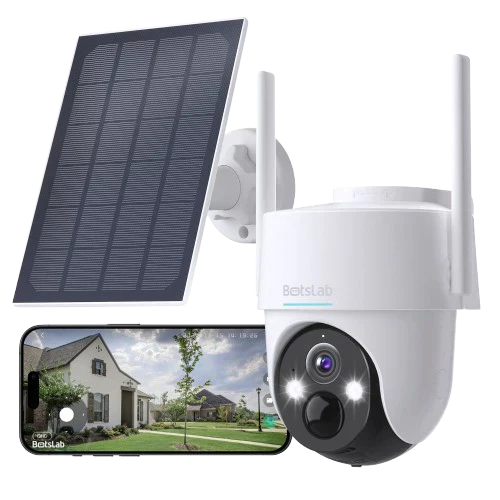
Best Overall for Comprehensive Coverage: Botslab Outdoor Pan/Tilt Cam 2K
The Botslab Outdoor Pan/Tilt Cam stands out as a phenomenal all-around choice for homeowners. It perfectly balances a robust feature set with user-friendly operation. Its 2K resolution delivers crisp, clear video, ensuring important details are not missed. The camera provides a complete 360° horizontal view and a 100° vertical tilt, effectively eliminating blind spots around your property.
Where it truly excels is its intelligent feature set. The camera is equipped with advanced AI to accurately detect human shapes, drastically reducing false alarms from other movements. Its auto-tracking function smoothly follows any detected person, and its powerful color night vision ensures you get vivid, detailed footage around the clock. With an IP66 weather-resistance rating, it is built to withstand the elements, making it a reliable guardian for any outdoor space.
Best for Smart Indoor Monitoring: Botslab Indoor Cam 2 Pro
For monitoring the inside of your home, the Botslab Indoor Cam 2 Pro offers a combination of high-end performance and intelligent design. It boasts an impressive 2.5K resolution for ultra-sharp video quality, allowing you to see every detail with clarity. Its pan and tilt functionality provides a full view of any room, making it ideal for large living spaces or keeping an eye on pets.
This camera's AI is particularly well-suited for indoor use, with features like human and pet detection, as well as abnormal sound detection that can alert you to a crying baby or breaking glass. Privacy is also a key consideration; a physical privacy shield can be activated to cover the lens when you are home, providing absolute peace of mind. The sleek, modern design allows it to blend seamlessly into any home decor.
Best for Budget-Friendly Indoor Pan & Tilt: TP-Link Tapo C210
For those seeking reliable pan and tilt functionality on a tighter budget, the TP-Link Tapo C210 is a strong contender. It offers a solid 2K resolution, a 360° horizontal range, and all the basic features needed for effective indoor monitoring. It includes motion detection, two-way audio, and a decent night vision range.
While its AI features are not as advanced as those found in premium models from Botslab, it provides dependable motion alerts and a user-friendly app experience. It represents an excellent entry point into the world of PTZ cameras without a significant financial investment.
Best for Advanced Optical Zoom: Reolink RLC-823A
When the ability to zoom in on distant objects without losing quality is your top priority, a camera with powerful optical zoom is essential. The Reolink RLC-823A is a leading choice in this category, often featuring 5X or higher optical zoom. This allows you to read a license plate or identify a face from a considerable distance with perfect clarity.
This model combines its powerful zoom with 4K resolution, AI-powered person and vehicle detection, and auto-tracking. It's a professional-grade security tool tailored for home use, ideal for monitoring large properties where identifying details at a distance is paramount. The trade-off is typically a higher price point and a bulkier design compared to more compact models.
How Do You Install and Set Up a Home PTZ Camera?
Setting up a modern PTZ camera is surprisingly straightforward. The general process involves a few simple steps:
- Choose the Location: Select a spot that offers the best vantage point of the area you want to monitor. For outdoor cameras, an elevated position under an eave is ideal for protection and a wider view. Ensure it's within range of your Wi-Fi network and a power outlet.
- Mount the Camera: Use the included mounting bracket and hardware to securely attach the camera to a wall or ceiling. Most cameras come with a template to make drilling holes easy.
- Connect to Power: Plug the camera's power adapter into a nearby outlet. For PoE cameras, connect the Ethernet cable to your router or PoE switch.
- Pair with the App: Download the manufacturer's mobile app (e.g., the Botslab app) to your smartphone. Follow the in-app instructions to create an account and add your new camera, which usually involves scanning a QR code on the device.
- Configure Settings: Once connected, use the app to configure settings such as motion detection sensitivity, notification preferences, patrol points, and night vision modes.
Frequently Asked Questions About Home PTZ Cameras
Here are answers to some common questions about using PTZ cameras for home security.
Can PTZ cameras operate automatically?
Yes. Most PTZ cameras can be configured to operate automatically in two ways. You can set up "patrols" or "tours" where the camera moves between several preset points on a schedule. More advanced cameras with AI can also perform "auto-tracking," where they automatically detect and follow a moving object like a person or vehicle without any user input.
Do PTZ cameras require a subscription?
Not necessarily. A subscription is typically only required for cloud storage services. Most core functions—such as live viewing, receiving motion alerts, and controlling the pan/tilt/zoom—are free. If your camera supports local storage via a microSD card, you can store video without any recurring fees. A subscription becomes an optional add-on for the convenience and security of off-site cloud storage.
How much area can a single PTZ camera cover?
A single PTZ camera can cover an exceptionally large area, often a full 360 degrees horizontally and over 90 degrees vertically. In practical terms, one well-placed outdoor PTZ camera can monitor the entire front or back of a typical house, including the yard, driveway, and entrance. An indoor PTZ camera can easily survey an entire open-plan living room, kitchen, and dining area from a single corner.











Share:
What are the Top Security Cameras for Construction Site Monitoring and Time-Lapse?
Which Video Doorbell Offers the Best High Dynamic Range (HDR) Video Quality?